First blog post on the new CohesionStack site (and the first written on CohesionStack about CohesionStack!).

If you’re experimenting with AI-assisted development or building lightweight metadata services, this write-up shares the patterns, missteps, and guardrails that translated into a working product.
Rebooting My Builder Instincts: Shipping CohesionStack’s Metadata Packer With AI
TL;DR
- After years leading software initiatives (26+ overall, 8+ at Amazon), I’m carving out focused time to personally build again. CohesionStack is the lab where I reconnect with development, experimentation, and continuous learning.
- First experiment: ship a metadata packer (site + API + dashboard) with AI assistants in rapid “describe → scaffold → verify → update → ship” loops.
- Result: www.cohesionstack.com now converts URLs into downloadable CSVs + assets, and the About/Blog sections document what I’m building and why.
- Key insight: AI only accelerates execution when wrapped in guardrails—tight prompts, deterministic scripts, instrumentation, and continuous verification. Most of all it requires patience and prompt-level feedback loops to stay on track.
- Next up: deeper experiments in APIs, AI-agent integrations, search, payments, cryptography, blockchain, and extended monitoring—with artifacts and scripts published along the way.
Pivoting Back to Hands-On Experimentation
For the past decade I’ve been shipping through teams—growing product/infra groups, coaching engineers, and modernizing platforms. I love that work, but I missed the instant feedback that comes from writing the code myself.
So I carved out CohesionStack as an independent lab. It’s where I can:
- Treat experimentation as a daily habit (small, reversible steps; heavy instrumentation).
- Dogfood my own advice—short design notes, explicit guardrails, feature flags, and “what changed?” telemetry.
- Share artifacts openly so other builders can reuse them.
What’s the Motivation?
- Stay sharp. AI-native tooling is changing everything. I want my instincts to come from doing, not just reviewing.
- Earn trust. When I advise on reliability, delivery discipline, or AI patterns, I should be able to point to running code, not just theory.
- Have fun again. Tinkering with cloud services, LLM prompts, and instrumentation puts me in the zone—time pauses, everything else takes a back seat.
Why CohesionStack?
- What’s in a name:
- The home page tagline is the mission: “An independent lab for experimentation and learning in technology.”
- The brand lets me publish experiments (metadata packer, more to come), blog what I learn, and expose APIs people can try immediately.
- The About page makes the offer clear: I’m still open to Director/Head of Engineering roles or fractional partnerships, but I’m equally excited to co-build niche tools.
First Experiment — Build a Working Site and App with AI Assistants
Goal: In under two weeks, produce a running service that:
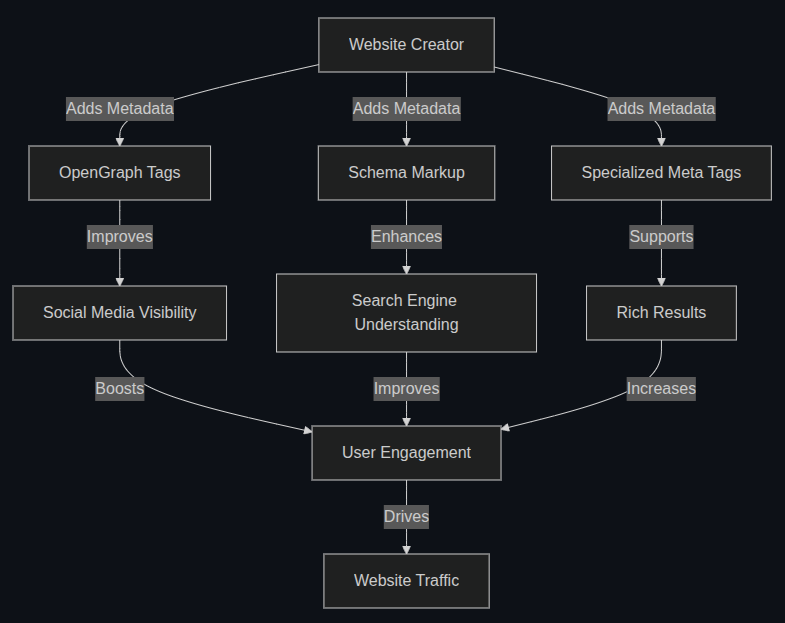
- Accepts up to 10 URLs, normalizes them, and fetches OpenGraph/Twitter/Favicon data.
- Saves assets + a CSV summary (with canonical URLs, OG/Twitter tags, authorship, image dimensions).
- Packages everything into a ZIP and lets users download it instantly.
Working With AI Assistants — Struggles & Tribulations
- Context loss between agents/tools. Switching between ChatGPT Codex, Copilot, and direct editing meant I regularly lost the conversation thread. Keeping
codex/2. design/metadatapacker-design.md,SURPRISES_AND_INSIGHTS.md, andJOURNEY_LOG.mdfresh was the only way to reconstruct intent after a tool reset. - Prompt loops and stubborn bugs. Some problems (e.g., “Failed — internal error” badge logic) refused to resolve through repeated prompting. I had to step away, run unit/integration tests, and debug manually before letting AI propose refactors again.
- Duplicate or conflicting code. Assistants happily reintroduced removed inline scripts or added redundant CSS/JS. Manual reviews and incremental commits kept the history clean.
- Tooling limits. I burned through my ChatGPT/Codex credits mid-week (documented in
SURPRISES_AND_INSIGHTS.md). Having Copilot as a fallback and a personal Kanban board prevented the stall from derailing the sprint. - Documentation as glue. Every time I hopped models, the combination of markdown docs + Kanban acted as shared context. For bigger experiments I plan to add Sonar-style static analysis, MCP servers for coding context, and better automation so assistants can “see” prior decisions.
Approach:
| Challenge | What Worked | What Didn’t Work | What I Might Try Next Time |
|---|---|---|---|
| Keeping the slice focused | Writing a one-sentence goal (“turn up to 10 URLs into CSV+ZIP”) and pasting it atop every prompt/document | Letting assistants improvise new scope mid-conversation | Attach the slice + acceptance tests as MCP context so each assistant sees the same guardrails |
| Scaffolding UI & copy | Copilot for repetitive HTML/CSS/SVG work, followed by manual review + instrumentation | Expecting AI to finish polish-level details (typography, CTA tone) | Pair Copilot with Sonar/linting so regressions get flagged earlier |
| Prompt loops on logic bugs | Falling back to unit/integration tests (RunHandlersTest, run_post_and_show_summary.sh) and fixing the root cause manually |
Re-asking the same question hoping the model “gets it” | Add automated regression prompts that reference failing tests so assistants work from concrete failures |
| Duplicate/inline code reappearing | Strict CSP, external JS modules, and code review before committing | Trusting generated diffs without a manual scan | Use MCP servers or lightweight AST checks to detect inline <script> regressions automatically |
| Context resets & tooling limits | Personal Kanban board + markdown logs; Copilot as fallback when ChatGPT credits ran out | Relying on one assistant for both ideation and verification | Evaluate Sonar, CodeQL, or other tooling to maintain “institutional memory” and surface drift automatically |
Outcome:
- www.cohesionstack.com is live with:
- A hero section describing the lab and pointing to the packer/blog/About page.
- A responsive About page that explains my experience, interests (technology, tinkering, team-building), and includes CTAs (“Work with me,” “Book appointment”).
- A working metadata packer that produces CSV + ZIP bundles immediately.
- Automated sitemap regeneration and Cloudflare deployment.
Five Key Lessons from the Build
- AI is a multiplier, not a surrogate. Giving assistants narrow prompts (“convert this timeline animation into an external module”) produces solid drafts. Expect to finish the last 20% yourself.
- Guardrails keep runs calm. The first UI screenshot in this post showed “Failed — internal error” even when only one URL was bad. Fixing the backend status logic plus adding regression tests (
RunHandlersTest) restored user trust—classic “disagree, commit, then document the fix” workflow. - CSP matters with assistants. AI loves inline scripts. I added a policy that anything requiring JS gets its own file + nonce. This made switching to strict CSP painless.
- Automation prevents outdated docs. The sitemap now rebuilds every deploy and includes every static page + blog post. No more manual XML edits.
- Narrative artifacts help you recover.
JOURNEY_LOG.md,SURPRISES_AND_INSIGHTS.md, and this blog keep the context alive when I switch between experiments or advisory calls.
Way Forward — Potential Next Experiments
Short-to-medium term areas I’m lining up:
- APIs: public endpoints for metadata enrichment, canonical URL detection, and eventually agent-friendly scoring.
- AI Agent Integrations: workflows where agents run the packer, inspect CSVs, and suggest follow-up actions.
- Search: custom embeddings or vector search for metadata fields.
- Payments: lightweight billing so teams can buy higher-volume packs.
- Cryptography & Blockchain: tamper-proof audit logs for metadata exports.
- Extended Monitoring: structured logging + OpenTelemetry hooks so users can see “what changed?” over time.
- UI & Animation notes: the home/about pages taught me how to keep assistants honest on layout/dark-mode issues, and building the magnetic “cohesion fluid” animation reminded me why front-end tinkering is still fun.
Each experiment will ship with a real artifact (CLI command, API spec, UI feature) and a short write-up.
Coming soon as separate posts: (1) SEO learnings from Experiment 01, and (2) how I migrated the legacy blog + UI using AI agents with almost zero spend.
Artifact for Readers — “Launch a Tiny Service in Five Passes”
1. Describe
Description: Capture the user outcome and the smallest deliverable that proves it works.
Example: “Turn up to 10 URLs into a CSV + ZIP with OG/Twitter metadata, images, and favicons.” This came straight from a mini PRFAQ/working-backwards exercise (Amazon habit) so the narrative, FAQ, and metrics were all aligned before I touched code. That sentence lived at the top of every prompt, Kanban card, and commit so scope never drifted.
2. Scaffold
Description: Use assistants/templates to rough in the solution, but keep prompts tiny and review every diff.
Example: Copilot generated the landing cards, hero layout, and timeline animation extraction. Before moving on I read the diff, enforced CSP (no inline scripts), added instrumentation, and tweaked accessibility details.
3. Verify
Description: Run the exact same checks at the end of each loop so regressions are obvious.
Example: Every change triggered run_post_and_show_summary.sh, mvn verify, and manual UI passes on desktop + mobile. If anything felt off, I logged it and didn’t proceed until the tests passed again.
4. Update
Description: Fix what verification surfaced—tighten prompts, edit code, or add tests—before layering new work.
Example: When the dashboard screamed “Failed — internal error” for a single bad URL, I added regression tests, corrected RunCreateHandler, and reworded the UI copy. Only then did I return to feature work—small, bias-for-action updates that keep the loop moving without waiting for a “perfect” plan.
5. Ship
Description: Publish the artifact and the story so others can reproduce the loop.
Example: Once the packer worked end-to-end, I automated the sitemap, deployed to Cloudflare Pages, wrote this post, and checked in the scripts/checklists I used so readers can follow along even without repo access.
Feel free to adapt this checklist for your own experiments! Iterating on these steps is mandatory—the loop is where the learning (and the shipping) happens.
Thanks for reading the first post on the new CohesionStack blog. If you want to collaborate, read the About page, drop a note via the booking link, and try the metadata packer. More experiments—and candid notes from the lab—coming soon.